Processing Excel dates in MATLAB on OS X
Originally published on quanttech.co. View saved original ↗
MATLAB's xlsread function tends to struggle with processing dates in Excel spreadsheets on OS X. For instance, given the following ASX50 price data in Excel:
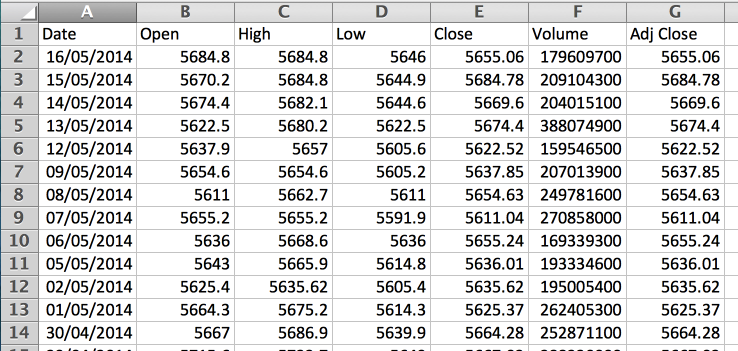
If we attempt to read this into a data matrix and column name vector, xlsread will interpret the dates as numeric values. The type of the column in Excel (General or Date) does not appear to matter, we still have the same issue regardless - datenum is attempting to read a numeric date so fails.
>> format shortE
>> [data, colnames]=xlsread('ASX50')

data =

   4.0313e+04   5.6848e+03   5.6848e+03   5.6460e+03   5.6551e+03   1.7961e+08   5.6551e+03
   4.0312e+04   5.6702e+03   5.6848e+03   5.6449e+03   5.6848e+03   2.0910e+08   5.6848e+03
   4.0311e+04   5.6744e+03   5.6821e+03   5.6446e+03   5.6696e+03   2.0402e+08   5.6696e+03
   4.0310e+04   5.6225e+03   5.6802e+03   5.6225e+03   5.6744e+03   3.8807e+08   5.6744e+03
   4.0309e+04   5.6379e+03   5.6570e+03   5.6056e+03   5.6225e+03   1.5955e+08   5.6225e+03
   4.0306e+04   5.6546e+03   5.6546e+03   5.6052e+03   5.6379e+03   2.0701e+08   5.6379e+03
...

>> dates=data(:, 1);
>> dates=datestr(datenum(dates, 'dd/mm/yyyy'), 'yyyymmdd')
Error using datenum (line 178)
DATENUM failed.

Caused by:
    Error using datenum (line 106)
    The input to DATENUM was not an array of strings.
Simplifying the above, using datestr alone will not fix this, due to discrepancies between date representation in Excel and MATLAB:
>> datestr(dates)

ans =

16-May-0110
15-May-0110
14-May-0110
13-May-0110
12-May-0110
09-May-0110
Dates in MATLAB are offset from 00 January 0000, whereas in Excel dates they are offset from 01 January 1900 in Windows and 01 January 1904 on Macs.
Adding this offset fixes our dates:
>> excelSerialDate = '01-Jan-1904';
>> dates=datestr(dates + datenum(excelSerialDate))

dates =

15-May-2010
14-May-2010
13-May-2010
12-May-2010
11-May-2010
08-May-2010
Then we can perform our original conversion:
>> datestr(datenum(dates, 'dd-mmm-yyyy'), 'yyyymmdd')

ans =

20100515
20100514
20100513
20100512
20100511
20100508
...
Alternatively, you can use the m2xdate function if you have the Financial Toolbox installed.
Cite this post
Conor Svensson (15 September 2014). Processing Excel dates in MATLAB on OS X. https://conorsvensson.com/archive/quanttech/processing-excel-dates-in-matlab-on-os-x/
BibTeX
@misc{svensson2014-processing-excel-dates-in-matlab-on-os-x,
  author = {Conor Svensson},
  title = {{Processing Excel dates in MATLAB on OS X}},
  year = {2014},
  month = sep,
  url = {https://conorsvensson.com/archive/quanttech/processing-excel-dates-in-matlab-on-os-x/}
}