Processing Excel data sources in Python
Originally published on quanttech.co. View saved original ↗
The Python Excel library provides a convenient api for working with Excel spreadsheets in Python.
Within the library, the xlrd module contains functionality for reading Excel spreadsheets.
For instance, Standard and Poors make available spreadsheets of all constituent members of their different indices. The below extract is taken from their S&P500 list.
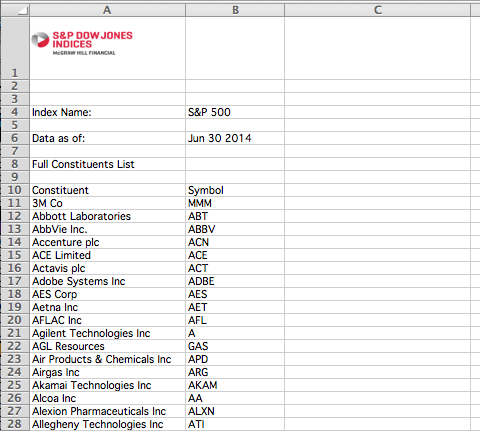
You can use the following code to download, and then process this data.
import urllib2

import xlrd


def _parse_response(response):
    book = xlrd.open_workbook(file_contents=response.read())
    sheet = book.sheet_by_index(0)

    headers = sheet.row_values(9, start_colx=0, end_colx=2)
    if headers == [u'Constituent', u'Symbol']:
        symbols = []
        for i in range(10, sheet.nrows):
            symbol = sheet.row_values(i, start_colx=1, end_colx=2)
            if symbol[0] is not '':
                symbols.append(symbol[0])
        return symbols
    else:
        print('Invalid sheet format')


def _write_symbols(symbols, destination):
    with open(destination, 'w') as f:
        for symbol in symbols:
            f.write(symbol + '\n')


def main():
    response = urllib2.urlopen('http://us.spindices.com/...')
    symbols = _parse_response(response)
    _write_symbols(symbols, 'symbols.txt')


if __name__ == '__main__':
    main()
Cite this post
Conor Svensson (25 August 2014). Processing Excel data sources in Python. https://conorsvensson.com/archive/quanttech/processing-excel-data-sources-in-python/
BibTeX
@misc{svensson2014-processing-excel-data-sources-in-python,
  author = {Conor Svensson},
  title = {{Processing Excel data sources in Python}},
  year = {2014},
  month = aug,
  url = {https://conorsvensson.com/archive/quanttech/processing-excel-data-sources-in-python/}
}